Guide
How to check your school's backups actually ran
A plain-English guide for school IT staff and business managers. Last checked against the DfE's cyber security standard on 19 November 2026.
A backup job that says “success” has told you one thing: it finished. It has not told you that the right machines were in it, that the copy is somewhere an attacker cannot reach, or that you could get a file back. This guide covers what to look at, how often, and how to run a restore test. It is written with Veeam and Microsoft DPM in mind, but most of it applies to any backup product.
What the DfE asks of you
The DfE's cyber security standard says IT support should keep at least 3 backup copies of important data on at least 2 separate devices, with one copy off-site. It says backups should be immutable, meaning they cannot be changed once they have been created. And it says to test and log your backups termly, or when there is a significant change.
If your school is in the Risk Protection Arrangement, its cyber cover has its own conditions about offline backups: see The RPA cyber cover conditions, checked.
What a successful-looking job can hide
- The wrong things are in the job. A server was added last term and nobody added it to the backup. The job is green. That server is not in it.
- It finished with warnings. A warning can mean part of the job did not work. Read it; do not dismiss it.
- Nothing ran, so nothing failed. A job that has been switched off or has stopped being scheduled produces no failure message. Its last good result just sits there looking fine.
- The newest copy is old. Microsoft DPM can still list a data source as protected while its newest recovery point is days old.
- The copy is within an attacker's reach. A backup on the same network, signed in with the same domain account, can be encrypted or deleted along with everything else.
- The backup disk is nearly full. The next job fails, or old copies are cut short, and you find out when you need them.
- The alert goes nowhere. Failure emails go to a mailbox nobody reads, or are sent through Microsoft 365, which may be the very thing that is down.
- Nobody has ever restored from it. Until someone has, you only hope it works.
Every morning: five minutes
- Is every job's last result a success? Read any warning.
- Did every job that should have run overnight actually run? Look at the times, not just the colour.
- Is there free space on the backup disk or repository?
Every week
- Compare the servers in your backup jobs with your real list of servers. Anything new?
- If you keep an offline or off-site copy, check it was actually rotated or updated.
- Check a failure alert really reaches a person who is not on leave. Send a test.
- Glance at how long each job took. A job that is suddenly much shorter may be skipping data.
Every term: a restore test
- Pick something that matters, such as a folder from the staff shared drive and your MIS database server.
- Restore one file and open it. Check it is the version you expected.
- Restore a whole server or virtual machine to an isolated network. Never restore over the live one. Check it starts and the data is current.
- Time it. That is your honest answer to “how long would the school be without this?”
- Write it down: the date, what you restored, who did it, how long it took, what went wrong. The DfE standard says to log it.
- Fix what you found, then do it again next term.
Where Groundskeeper helps — and where it does not
Groundskeeper by RSJ Software is IT monitoring for schools. It only watches; it never changes anything on your backup systems.
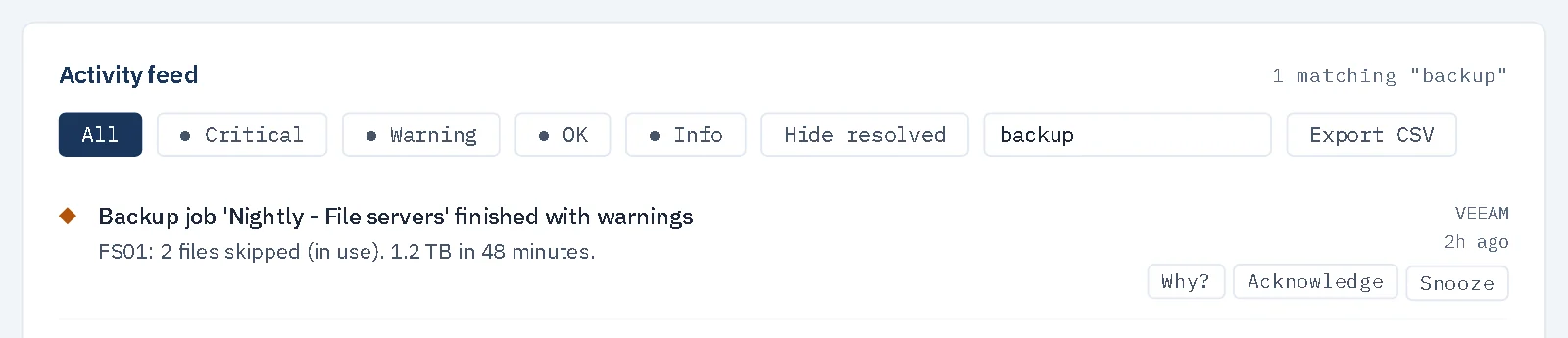
- Veeam. It reads each backup job's last result and posts an event when a job fails or finishes with a warning, and another when it recovers. It works with Veeam Backup & Replication 12 and 13 and checks every 30 minutes by default. It reads through Veeam's REST API or, because Veeam opens that only on some licences, through Veeam PowerShell, which works on every edition.
- Microsoft DPM (beta). It reports a data source whose newest backup is older than 3 days (a warning) or 7 days (critical), or that has no backup at all, even while DPM still calls it protected. It also reports DPM's own active alerts and its services stopping. The day limits are settings. It has been checked against one real DPM 2025 server so far.
- Synology NAS (beta). It warns when a Hyper Backup or Active Backup for Business task failed on its last run, or has not succeeded in 2 days (a setting).
- It does not test your restores, and it cannot tell whether a copy is genuinely offline, immutable or off-site. It cannot know that a server missing from a job should be in it. It works from the result Veeam reports for each job, so a job that has simply been switched off is something you still check yourself.
- It has no check for other backup products, such as cloud backup services or Windows Server Backup.
- Silence is the signal. Groundskeeper reports problems, so a quiet feed means no job it reads has failed. A connector that has stopped polling is shown as Not polling, so you can tell that apart from a healthy one.
There is a free Community edition. See pricing for what each edition includes.
Find out more about GroundskeeperQuestions people ask
How often should a school test restoring from backup?
The DfE's cyber security standard says to test and log backups termly, or when there is a significant change. Restoring one file and one whole server each term is a sensible minimum.
Is a green success result in Veeam enough?
No. It tells you the job finished. It does not tell you the right machines are in the job, that the copy is out of an attacker's reach, or that you could restore from it.
Can Groundskeeper tell me if my backup is offline?
No. Groundskeeper by RSJ Software reads job results from Veeam, and in beta from Microsoft DPM and Synology backup tasks. It cannot tell whether a copy is offline, immutable or off-site, and it does not test restores.
More guides: What to monitor on a school network · Free IT monitoring for a small school · The DfE filtering and monitoring standards, explained · Cyber Essentials for schools: what you actually need · The RPA cyber cover conditions, checked · Microsoft 365 Education changes: what UK schools need to know.
All guides, documentation and videos.
The official guidance: Cyber security: core standard (DfE), last updated by the DfE on 16 September 2026. This guide is a summary to help you find your way around it; where they differ, the DfE's own wording is what counts.